


A self-deploying Autopilot device. Shared PC configuration from Intune. ESP device phase. And nothing happening for about half an hour.
The Intune Management Extension was installed. The service was running. The Win32 apps just didn’t start. Then, with no input from me, six apps installed in a few minutes and the deployment finished.
I ran into this on Autopilot Self-Deploying, and I handed the case to Rudy Ooms. He figured it out, which will surprise nobody. His full write-up is on the Patch My PC blog: How MDMWinsOverGP Caused a 30 Minute Autopilot App Delay.
Read it. This post is the short version of what I saw and what Rudy found.
Ten minutes, three times
Here is the timeline from my October 29 run (UTC):
09:15:33  ESP provider query starts
09:44:39  AppWorkload provider query returns
09:51:03  all six applicable apps complete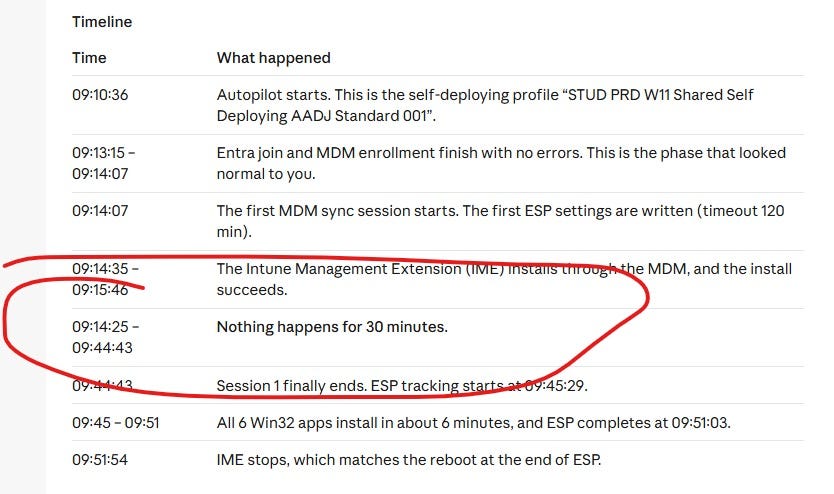
Almost 30 minutes of waiting, then seven minutes of work.
The System log had the other half. Group Policy Event 1502 showed three records with a processing time of about 600,000 ms. A fourth finished in 297 ms.
Ten minutes, on the dot, three times. Rudy saw it immediately. That is the maximum time Windows lets a policy lock be held. Something was waiting for a lock and giving up.
Shared PC does local Group Policy work
Shared PC mode is applied by the Shared PC CSP. Several of its options (education, power, sign-in) write to local Group Policy. So a cloud-only device with no domain anywhere near it still does GPO work.
Rudy’s analysis shows how that gets stuck. The MDM client holds a Group Policy reader while it waits for a Shared PC worker. The worker needs its own reader, but a Group Policy writer is already queued, so the worker lines up behind it. The parent waits for the child, the child waits for the writer, and the writer waits for the parent.
Windows gives up after ten minutes and carries on. Then the next batch can do it again. In the trace in Rudy’s article the Shared PC with OneDrive step took 600 seconds and the power policy another 600. The education policy took 42 milliseconds. Timing luck.
IME makes synchronous calls into Windows, so it got stuck in the same wait. That is why my Win32 apps never started. HealthScripts still ran, by the way, through a separate path.
To be fair to Rudy, he is careful about this. It is his analysis of the code and the logging, not an official Microsoft explanation.
The flag came from Autopatch
The trigger is MDMWinsOverGP, set to 1 under HKLM\SOFTWARE\Microsoft\PolicyManager\current\device\ControlPolicyConflict. With that flag on, the configuration manager holds the policy sections while it works. That is the reader the MDM client was sitting on.
In my case the flag came from the Windows Autopatch Edge Update profile. Autopatch generates these per group and ring. Rudy could not find any Microsoft documentation on why the flag is in there. A post from Sastu Insights found the same setting in other Autopatch profiles, so it is not a one-off.
The workaround
I changed the Autopatch settings (for the Shared devices) so they no longer include Edge updates. That removes the profile that sets MDMWinsOverGP. The device that had taken more than 35 minutes to enroll finished in about 7.

That is a workaround for this deployment, not a fix. It also means Autopatch no longer manages Edge for those devices, so you need another plan for that. If your pain is only Windows Update, Rudy also covers IgnoreWindowsUpdateGroupPolicies, which skips the Windows Update GPO reader.
Check first
If your self-deploying Shared PCs feel slow, look at these three things:
Big gaps in the IME and AppWorkload logs around the ESP calls, before any app work starts.
Event 1502 in the System log with
ProcessingTimeInMillisecondsnear 600000.Shared PC settings plus
MDMWinsOverGP= 1 in the registry path above.
All three match? Take a WPR trace. That is how you can confirm who holds the reader, which writer is queued and when the worker asks for its next one.
Thanks, Rudy. 🍻
That is it for now. Until next time. 👋