


Just a quick, short blog post this time. And it's about how you can restrict in Microsoft Edge that only one of your company's accounts can sign in to sync and no other accounts during the Sync opt-in window.
The advantage, at least that's what I think, is that you can create multiple profiles in Microsoft Edge and then you can turn on the sync, so that you keep the same settings everywhere you log in, in Microsoft Edge.
But alas.... there are also companies that think you should only sync in Microsoft Edge with your work account. And no other accounts. 😒 This wish came from the organization where I am now, and I found out that it is possible with the following policy "RestrictSigninToPattern".
In this blog post I will show you how you can set that up in Microsoft Endpoint Manager. 👇
Go to the Enpoint Manager portal
Go to Devices -> Windows and click on Configuration profiles
Select the Create profile button
By the Platform dropdown, select Windows 10 and later
By the Profile type dropdown, select Settings catalog (preview)
Select the Create button
Give the policy a name, and click on Next
Select the + Add settings button
On the right side, in the Settings picker, type
RestrictSigninToPatternin the search fieldSelect the Microsoft Edge button
Check, suitable for your environment, the device or the user setting. I will go for the device setting
Then you can Enable the setting, through the Restrict which accounts can be used as Microsoft Edge primary accounts "switch"
In the Restrict which accounts can be used as Microsoft Edge primary accounts (Device) field, you need to type the preferred UPN, in the following pattern
.*@theorange.catSelect the Next button
Assign it to a group
Select the Next button
At the Review + create tab, Select the Create button
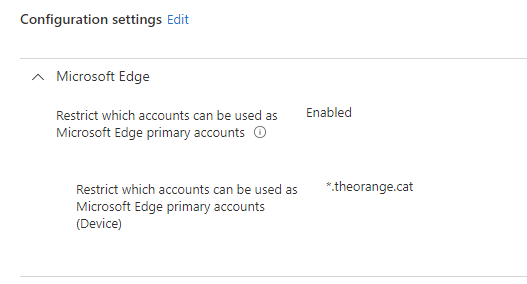
The End result
After your device picked up the new policy setting, you will notice that it is impossible to add a different UPN to the Microsoft Edge browser, as you can see on the recording below.
That's it for today. Happy reading and until next time.